
A digital audio workstation (DAW) is software for recording, editing, arranging, and mixing audio and MIDI. It’s the central hub of your music production setup, where you can record your instruments or use virtual instruments, effects, and samples.
Whether you’re making beats, recording vocals, or scoring a film, you’ll need a DAW to capture, mix, and produce your music.
Waveform Free

Waveform Free is a fully featured free DAW for Windows, macOS, Linux, and even Raspberry Pi. It supports third-party plugins (VST, VST3, and AU), so you can expand it with hundreds of free plugins that are available online.
The software is based on the commercial version of Tracktion Corporation’s Waveform, but there are no limitations on track counts, third-party plugins, exporting/rendering, or project saving. You have unlimited audio and MIDI tracks to work with, along with a decent selection of built-in instruments and effects.
There are also no copyright restrictions on the music you create with Waveform Free. You can use it for free and for commercial projects.
Regarding raw power and functionality, Waveform Free is on par with most commercial music production software. You can use it to record and edit audio and MIDI, apply effects, and export professional mixes in a wide range of audio formats.
The main drawback is the user interface. We found it hard to get used to because it was coming from another DAW (Studio One). Waveform Free has a unique layout that puts all the controls in a single panel to simplify the workflow. It works great once you get used to it, but there’s definitely a learning curve.
Overall, we think Waveform Free is the best free DAW for beginners. It provides all the necessary tools to record and produce music with almost no limitations or missing features.
LUNA

LUNA is a powerful free DAW from Universal Audio, now available for both macOS and Windows.
It offers a pro-level recording and mixing environment and stands out with built-in tape emulation and analog-style console summing. The analog emulation gives a warm, vintage sound straight out of the box.
LUNA is especially well-suited for recording, mixing, and analog-style workflows, making it an excellent option for beginners and experienced producers. The interface is sleek and intuitive, and it includes high-quality virtual instruments and effects with no track limits or feature restrictions.
Integration with Universal Audio hardware is seamless, offering near-zero latency tracking and advanced features like Unison preamps. However, users without UA gear can still take full advantage of the DAW’s core features, though premium extensions may require extra purchases.
LUNA only supports AU plugins on Mac and VST3 on Windows, which might limit some third-party plugin compatibility. Overall, it’s one of the most fully featured free DAWs available, especially if you’re after a classic studio sound and smooth workflow.
Garageband
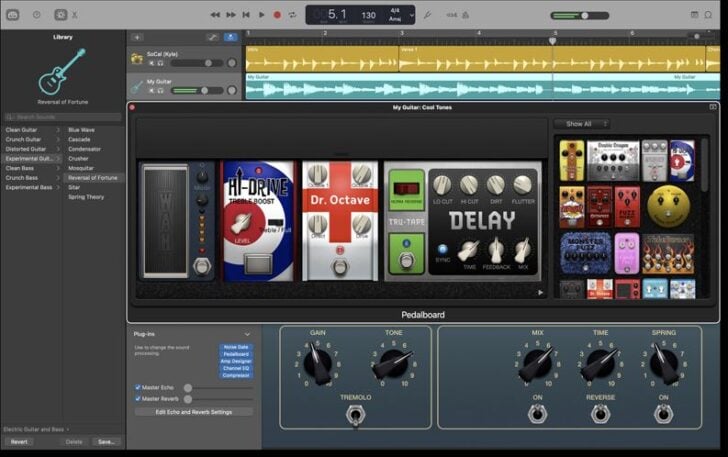
GarageBand is a free, beginner-friendly digital audio workstation (DAW) that comes preinstalled on Mac computers. It has an intuitive interface with a super intuitive drag-and-drop workflow.
If you’re entirely new to music production and own a macOS device, we highly recommend playing around in Garageband for a few days before moving to a more advanced DAW like Waveform Free or LUA.
It offers multi-track recording, virtual instruments, and a massive library of loops and sounds. These tools will help you understand how music production software works and get you started with songwriting and mixing.
Unfortunately, GarageBand lacks advanced mixing options or third-party plugin support. You’re limited to the instruments and effects that are included in the software.